Safety Regulations
The following provides all the information necessary to safely operate the previously listed products of OFFROADWTF. Please read this manual thoroughly before installing or operating your new product in order to prevent any damage or injury. Failure to follow the listed instructions in this manual may result in damage to your products or personal injury.
- Proper installation of this product requires good knowledge of automotive systems, electronics and procedures.
- Please guarantee all vital components of the vehicle are not in danger of being damages by drilling holes necessary for installation. Check all sides of the mounting surface before drilling any holes into the vehicle.
- Do not install this product in any way that interferes with the deployment of the air bag. Doing so may damage the effectiveness of the air bag and can lead to serious personal and vehicle injury. The installer will assume full responsibility of proper installation of the new unit.
- Please clean the mounting surface before installation of the unit when using screws, tape, brackets, magnets or velcro.
- The product’s ground wire must be connected directly to the Negative (-) battery post for effective use of the unit. Please follow all wiring guidlines provide to guarantee long lifespan and productivity. Failing to follow these instructions may result in damage of the product.
Wiring Diagram
| Wire: | Function: |
|---|---|
| Red | 12V/24V+ (positive) |
| Black | 12V/24V- (negative) |
| Blue | 12V/24V+ (positive) BLF |
Brake Light Function (BLF): The bluetooth controller must be configured to recieve constant power for the brake function to work. Connect the blue wire of the bluetooth controller to the positive wire of your brake lights. When brakes are applied all offroadwtfled RGBW products connected to the controller will override to red. Once brakes are released the lights will return to the last state.
Mounting Controller: The bluetooth controller must be mounted in a secure location away from any hot surfaces and or surfaces that may be fully submerged. If using a external switch (not provided) use a relay to ensure the controller recieves adequate power. The controller’s ground wire must be connected directly to the Negative (-) battery post for effective use.
Connecting Products: Using the provided splitters and or extention leads, follow the arrows located on the outside of the connectors. Insert the male waterproof connector from the product into the female waterpoof connector of the bluetooth controller. Do not force the connectors together, make sure the arrows, pins and guide tooth are aligned. Doing so may damage the effectiveness of the product.
Each time the controller is provided power, the products will light all led modules. If it is the first time the controller is being provided power, the lights will turn pure white (if applicable).
Controlling Lights
Download App: Download the app using the QR code found on the card or download here! Once the app is installed, simply open the app, you may be required to enable bluetooth on your device. Please make sure controller is powered on, you may now control products connected to controller(s)!
Andorid Users: Please select LED BLE in the app to connect and control lights.
Powering On/Off: If you are not using a switch or similar to power the controller, you may use the power button inside the app to turn On/Off lights. Please note that a small amount of power is used as the controller is searching for a command. It is recommend to power the controller by switch, but is not required.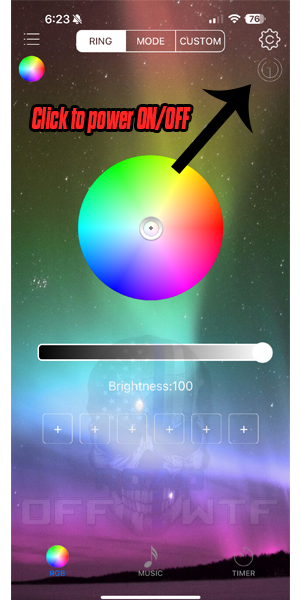
Color Wheel Selection: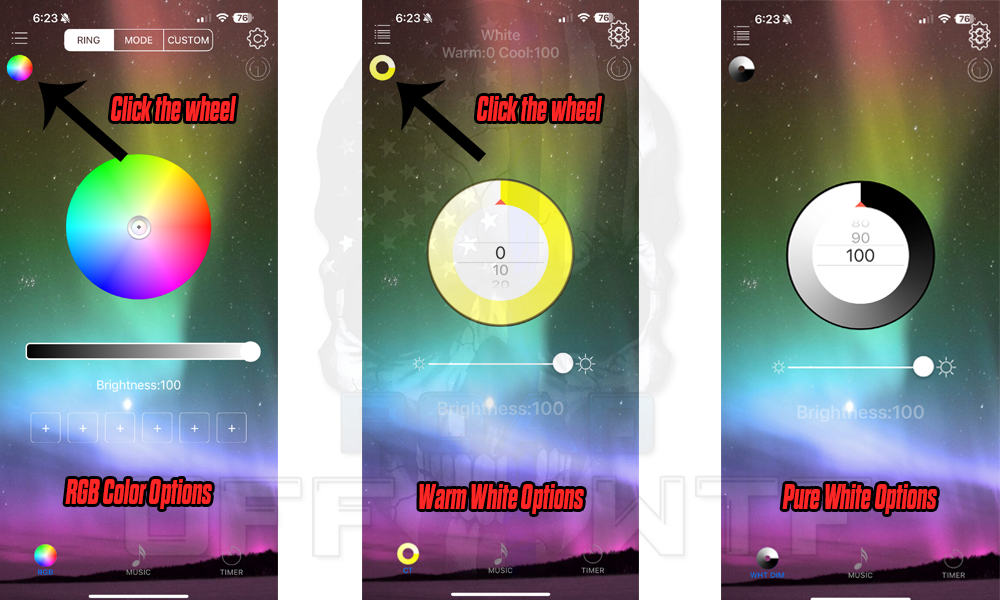
If you have any questions or concerns please email us at [email protected]!